My Hotel Lobby AI / Guides
Hotel Lobby AI Prompt (Copy and Paste)
Copy-and-paste Hotel Lobby AI prompt
This prompt is based on the one our own generator uses in production. We refined it over dozens of test videos until the orange walls and the hanging microphone came out right nearly every time. Attach one photo per performer as reference images, in left-to-right order, then paste:
Vertical 9:16 music performance video, about 8 seconds. Image 1 is the LEFT performer and Image 2 is the RIGHT performer; these are two separate people, not first and last frames. Keep both faces and identities recognizable. The two performers stand side by side in a vivid, evenly lit orange recording booth; every visible wall is orange. One black studio microphone hangs on a thin cable from the top center of the frame, between them, with its bottom unattached. No microphone stand, no boom arm, no tabletop microphone, no furniture. Medium upper-body framing, static camera. Both perform with natural rap gestures and rhythmic energy for the whole clip. Original upbeat instrumental hip-hop beat. No existing song, lyrics, logos or watermarks. No extra people, no merged faces.Video models differ, so treat this as a starting point. If your tool has a separate “negative prompt” box, move the “no microphone stand, no furniture” part there.
What each part of the prompt controls
Every line in the Hotel Lobby AI prompt is there because something went wrong without it. The drawing below maps the main parts of the prompt onto the scene.
| Prompt line | What it prevents |
|---|---|
| “Image 1 is the LEFT performer…” | Both people merging into one, or the model treating the photos as the start and end of the clip |
| “Every visible wall is orange” | The background drifting to beige, gray or yellow |
| “Hangs on a thin cable from the top center” | A microphone stand, boom arm or desk microphone appearing instead |
| “Medium upper-body framing, static camera” | Faces becoming too small to recognize, or the camera wandering off |
| “Original beat, no existing song” | Reusing a copyrighted recording that can get your clip muted |
What we learned testing the prompt
Our first version of the prompt only described an orange booth and a microphone. In early tests, some videos drifted to pale backgrounds, and some swapped the hanging microphone for a microphone stand. Saying “every visible wall is orange” and spelling out what the microphone must not be fixed both problems.
With the final Hotel Lobby AI prompt, 42 of 44 test videos passed our frame-by-frame review. The two misses were about motion, not the scene: in one, both performers walked in from the edges during the first second; in the other, a performer turned away from the camera briefly.
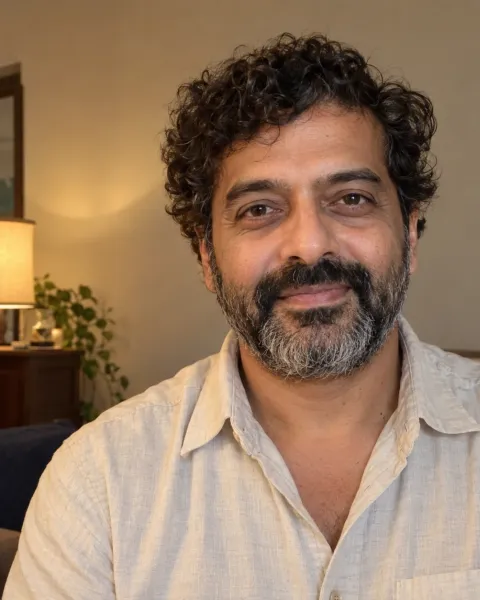
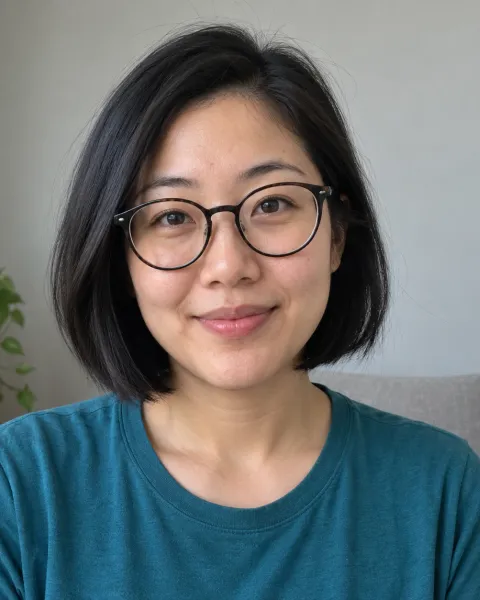
Glasses and curls
Glasses, beard and curly hair stay recognizable through the whole clip. Fictional test portraits.
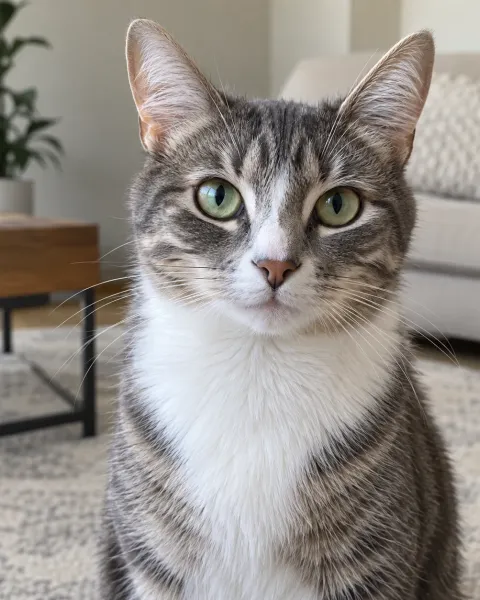
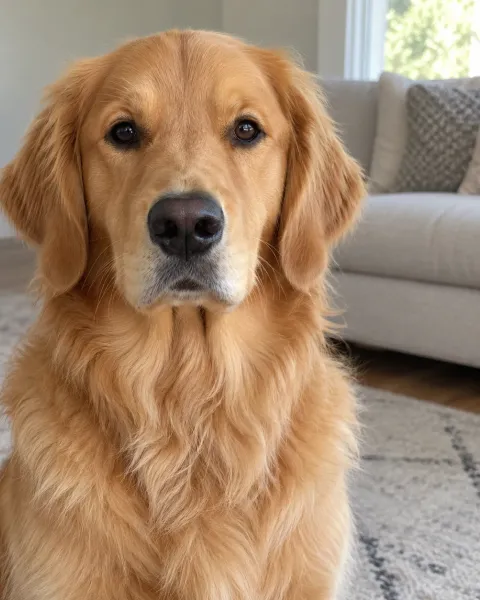
Cat and dog duet
Two pet photos, no people at all. Fictional test photos of a tabby and a retriever.
Choosing reference photos for your prompt
With image-to-video models, the reference photos matter more than the wording. A perfect Hotel Lobby AI prompt cannot rescue a dark, blurry or side-on photo. Give each performer a sharp, front-facing, head-and-shoulders picture with even light, one subject per image. Photos with similar lighting help the two performers look like they share the same room. Crop out other people, text and stickers before you upload.
Prompt variations that work
Keep the core of the prompt the same and change one line at a time. These tweaks came out of our own testing:
- For pets, name each animal and its side: “Image 1 is a ginger cat on the LEFT, Image 2 is a beagle on the RIGHT.” Add “each animal keeps its natural size and sits upright” to stop a cat being drawn at human size or standing on its hind legs.
- For a person and a pet, say which one is the person: “Image 1 is a woman on the LEFT, Image 2 is her dog on the RIGHT.”
- For more energy, change “natural rap gestures” to “big, confident rap gestures and head nods on every beat”.
- For a calmer, deadpan clip, ask for “minimal movement, slow nods, serious expressions”.
Common prompt problems and fixes
- Only one performer appears: add “both appear together for the entire clip”.
- Faces drift or blend: use sharper, front-facing reference photos rather than a longer prompt.
- A microphone stand appears: add “no microphone stand, no boom arm, no tabletop microphone”.
- The background is not orange: repeat that every visible wall is orange, and ban beige, gray and yellow.
- Performers walk in or out of frame: add “both performers are in place from the first frame, static camera”.
- The model adds a real song or lyrics: ask for an instrumental beat and say no lyrics.
Check the result before you post
This is the checklist we use when we review a video made with our Hotel Lobby AI prompt. If any line fails, change one thing and try again:
- Both faces are recognizable, and each performer looks like their photo.
- Photo 1 is on the left and Photo 2 is on the right for the whole clip.
- Exactly two performers: no extra people, merged faces or extra hands.
- The microphone hangs from above, between them, with no stand or desk.
- Every wall is orange, from the first frame to the last.
- The audio is an original beat, not a real song with lyrics.
Skip the prompt entirely
Writing and testing a Hotel Lobby AI prompt takes time, and every failed try on a paid model costs money. My Hotel Lobby AI runs the tested production prompt and settings for you. You only choose two photos and get an 8-second, 9:16 vertical MP4 in 720p for $5.99, with no prompt writing, model picking or editing, and your credits come back automatically if a generation fails.
Frequently asked questions
What is the prompt for the Hotel Lobby AI video?
Describe two performers side by side in a seamless orange booth, one black microphone hanging from the top center between them, upper-body framing, a static camera and rap gestures, and attach one reference photo per performer.
Do I need a prompt to use My Hotel Lobby AI?
No. The prompt and settings are built in. You only upload two photos.
Which AI models can use this prompt?
Any image-to-video model that accepts two reference images and a text prompt. Results vary by model, so check the left and right placement and the hanging microphone first.
Why does my Hotel Lobby AI prompt keep adding a microphone stand?
Many models picture a microphone on a stand by default. Say the microphone hangs from a cable at the top center with its bottom unattached, and list the things it must not be: stand, boom arm or tabletop microphone.
How do I write a Hotel Lobby AI prompt for pets?
Name each animal and its side, for example a ginger cat on the left and a beagle on the right, and add that each animal keeps its natural size and sits upright.
Can I use the original song in my prompt?
We recommend against it. Ask for an original beat and add licensed music on TikTok, Instagram or YouTube when you post.
My Hotel Lobby AI is an independent AI creation tool. It is not affiliated with, endorsed by or sponsored by the original artists, their record labels, any performance channel, TikTok, Instagram, YouTube or any other brand mentioned on this site. The original Hotel Lobby recording is not included in any video.